7 minutes
Freeing Dev Hunter from Excel 2000
Dev Hunter is a small game hidden inside Microsoft Excel 2000. It was one of the few pastimes I had during the dull computer classes I sat through in high school, and, like all adults who grow nostalgic for the things they had when they were young, I eventually went looking for it again.
This post is the whole story of chasing it down: first getting the game to run on its own outside of Excel, and then — years later — freeing it completely, into a standalone program that carries nothing of Excel with it at all.
What Dev Hunter is
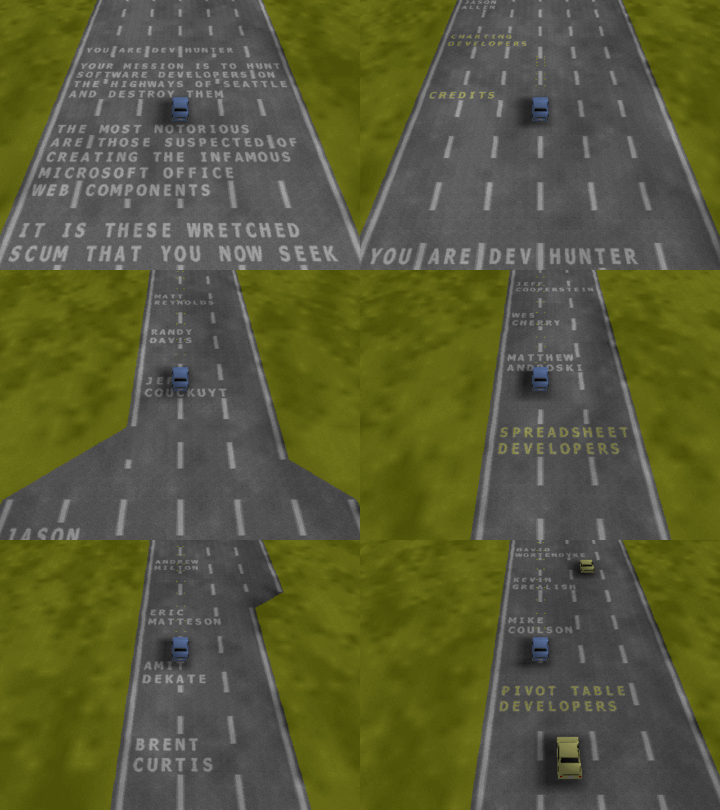
To trigger the Easter egg in Excel 2000, you navigate to the cell WC2000 and press the little Office logo. Up pops a 2D driving game: you steer a car down a highway and shoot the cars ahead of you. It is called Dev Hunter because the road is painted with the names of the Excel developers — you are, the game informs you, hunting them down. Between the names it scrolls taunts at you like “Pivot! Pivot! Pivot!” and “You will respect the rectangles.”
Getting it out of Excel
The first step, back in 2019, was just to get it running at all. Excel 2000 does not install on a modern machine, so I started inside a Windows XP virtual machine, and after enough fiddling, Dev Hunter popped up. I played it for a few minutes and found it… not that interesting anymore. Maybe it was only ever interesting because I had nothing else to do. But by then I had become a reverse engineer, and a more interesting question had already taken hold: how is this thing actually implemented?
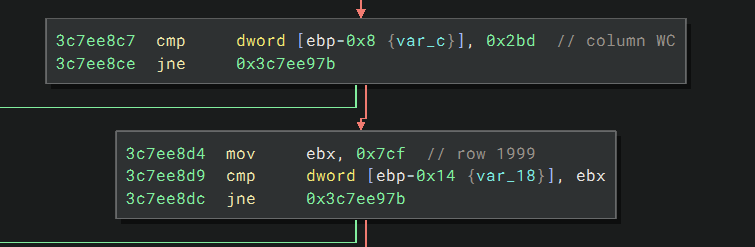
To get to the game, I exported the spreadsheet to a web page, and that page references the CLSID 0002E510-0000-0000-C000-000000000046, which points at MSOWC.DLL — the Office Web Components control. I loaded that DLL into Binary Ninja, searched for the string “Dev Hunter,” and landed straight in the function that holds the game logic. Its parent runs the familiar PeekMessage / TranslateMessage / DispatchMessage loop; its grandparent is the part that decides whether to trigger the egg at all, by checking that you are sitting on row 0x7cf (1999) and column 0x2bd (WC):
I could have stopped there, but I wanted to run the game on its own, without the entire bulk of Excel behind it. The message-loop function turned out to be conveniently self-contained. It is thiscall, with ecx pointing at a large buffer that is really a C++ object — and the game does not depend on anything being in that buffer beforehand. So I could simply allocate 0x100000 bytes, zero them, and hand that over as ecx, along with three stack arguments: a handle to the DLL, a zero, and a magic 0x7fa87860 that turns out to control the car colors. The whole loader is only a few dozen lines of assembly:
; PAGE_READWRITE
push 0x4
; MEM_COMMIT
push 0x1000
; size
push 0x100000
push 0
call [VA(VirtualAlloc)]
mov  edx, eax

; zero the allocated page
mov  edi, eax
xor  eax, eax
mov  ecx, 0x40000
stosd

mov  ecx, edx          ; hand the buffer over as `this`
push VA(Dll)
call [VA(LoadLibraryA)]

push 0x7fa87860        ; magic constant — the player car's color
push 0
push eax
add  eax, 0x10c946     ; func2 = DLL base + 0x10c946
call eax
Compiled to a tiny loader.exe — and, with a couple of patches plus the wonderful DDrawCompat shim to make its ancient DirectDraw calls behave on modern Windows, the game ran outside of Excel. Here it is running standalone, straight from the loader:
I wrote that adventure up as an article in Paged Out! #6, published in March 2025. One detail I only chased down while writing it: the developer names are stored XOR-encrypted with the byte 0x52, and, of all things, in CBC mode — you can read the decrypted roll of names that scrolls down the road. The loader itself lives at github.com/jeffli678/excel2000-devhunter-loader.
Freeing it completely
The loader was a good trick, but it still needs MSOWC.DLL. And that DLL, with its ancient DirectDraw, only gets harder to run with every passing year. What I really wanted was to rewrite the game completely: to reimplement it as a small standalone program with no external dependencies.
This time I did not write it myself. I had an AI agent do the entire job: reverse engineer MSOWC.DLL and translate the game into a standalone C++ program, while I steered.
Working from Binary Ninja’s decompilation, the AI rebuilt the game piece by piece — the recovered 256-color palette, the decrypted developer text, the floating-point RNG, the perspective projection, and, crucially, the DLL’s real render and rasterizer routines, all translated into C. It built, and it ran. And it looked badly wrong:
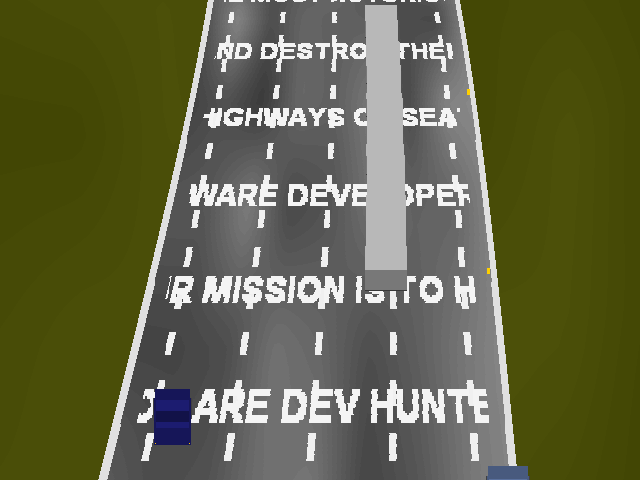
The names spill off the tarmac, the road is at the wrong scale, and the cars are reduced to blocks. The integer and pointer code had come across faithfully, but the geometry runs entirely on the x87 FPU stack, and it is not decompiled perfectly. Each little error was invisible in the listing, and no amount of re-reading it was going to fix them.
At this point I stepped in — I told it to run the original under Binary Ninja’s debugger and compare against ground truth.
The AI scripted the headless debugger to launch the real game, break right before the DirectDraw Unlock — the moment the finished frame exists in memory but is not yet on screen — and read out the live 8-bit framebuffer, using the pixel pointer at *(this+0x34) and the row pitch at *(this+0x20), together with the entire ~0x9a96c-byte game object. Then it diffed its own rendering against those real pixels, frame by frame, and checked the physics by comparing the game object before and after a single tick.
That changed everything. Every vague “it looks off” became a specific, usually one-line fix: a projection edge the decompiler had turned into a running total (which sheared the road); a floating-point value dropped off the FPU stack, so the off-road crash check was reading the odometer instead of the car’s speed; a texture-row mask that is really and al, 0xe0 — a low-byte-only mask that keeps 32 rows — rather than the full-width & 0xe0 the decompiler implied, which had crushed the letters. One by one, the render converged on the original:
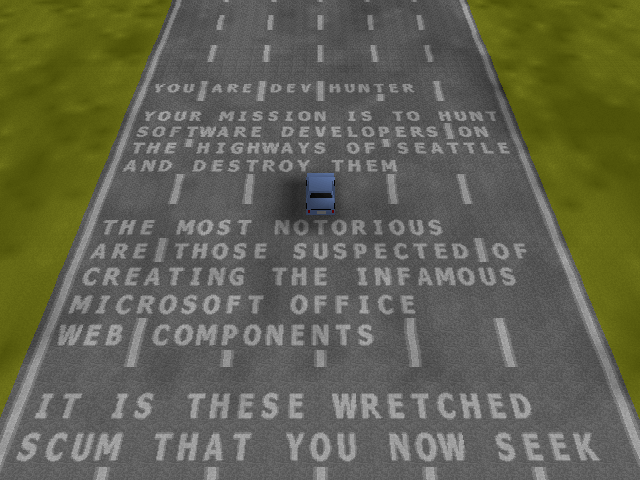
Getting to a clean comparison took two more tricks. The game’s one-time setup (terrain, textures, and a 3D letter atlas built with GDI) is deterministic, seeded from zero, so rather than re-derive that gnarly initialization the port simply loads a snapshot of its exact output and relocates the pointers inside it. And because the game derives its frame timing from the wall clock, headless runs were not even reproducible until I had it wire in a fixed virtual clock — only then could a SHA-256 of the frame dumps prove that the two are truly the same.
The source, build instructions, and a playable Windows release are on GitHub: github.com/xusheng6/excel2000-devhunter-standalone.
What I take away from it
The lesson I take away is about the limits of static reverse engineering. Even with a capable AI agent driving it, reading the disassembly got the port perhaps 90% of the way, and then stalled — the remaining errors simply were not visible in the code it was reading. Debugging is the right way to close the gap.
And at the end of it, Dev Hunter is out. A little game that spent twenty-five years locked inside an office suite that barely runs anymore is now a few hundred kilobytes you can clone, compile, and play in a window. I doubt the developers who hid their names in that road ever expected someone to come along, decades later, and rewrite the whole thing.